Email Marketing 101 — From Setup to Strategy
Make your mails become the best sell companion
📩 Email Marketing 101 — From Setup to Strategy
🧭 What You’ll Learn
What email marketing is and why it matters
How to create professional domain-based mail accounts
The difference between IMAP and SMTP protocols
The best free and paid email hosting options
How to connect your domain, send newsletters, and automate campaigns
1️⃣ What Is Email Marketing?
Email marketing is the direct communication channel between your brand and your audience — built through owned contact lists rather than paid ads or social algorithms.
It’s the most personal, reliable, and cost-effective form of digital marketing, used to:
Nurture leads and convert them into paying customers
Retain users through regular updates and promotions
Build trust and brand awareness
Drive traffic to your website, course, or product launch
💬 In simple terms: Email marketing turns “visitors” into “followers,” and “followers” into “loyal customers.”
2️⃣ Why Use Email Marketing?
Goal | Example | Result |
|---|---|---|
🏗️ Build Relationships | Send welcome emails, behind-the-scenes updates | Increases trust |
🛍️ Promote Products | Share new product launches or discounts | Drives sales |
📚 Educate Users | Offer tips, guides, or newsletters | Builds authority |
🔁 Retain Users | Send reactivation or feedback campaigns | Reduces churn |
Email marketing outperforms social media and ads because it’s owned — you control the list, the message, and the timing.
3️⃣ How to Create Email Accounts Using Your Domain
To build trust and brand professionalism, you should use an address like
[email protected] instead of a free Gmail or Outlook address.
There are two main approaches:
💡Free Options (Best for Starters)
Service | Key Features | Best For |
|---|---|---|
Zoho Mail | Custom domain for up to 5 users, 5 GB inbox, no ads | Small businesses starting out |
Gmail (via domain integration) | Connect your domain via SMTP/POP3 | Using Gmail UI with custom domain |
ProtonMail | Free encrypted email, 500 MB storage | Privacy-focused users |
Yandex Mail for Domain | 1,000 free accounts, unlimited storage | Global teams, especially Europe/Asia |
ImprovMX | Free email forwarding (no mailbox) | Simple redirect to existing inbox |
Cloudflare Email Routing | Free domain forwarding | Personal or portfolio sites |
💸 Paid Options (For Teams & Reliability)
Service | Features | Price (USD/user) |
|---|---|---|
Google Workspace | Gmail, Drive, Calendar, Meet | From $6/month |
Microsoft 365 Exchange | Outlook + Office apps | From $6/month |
Titan Email | Read receipts, scheduling, calendars | From $1.50/month |
Bluehost / Hostinger / Namecheap | Hosting + custom domain mailbox | From $0.99–$1.99/month |
Zoho Workplace | 50 GB inbox, docs, team chat | From $1/month |
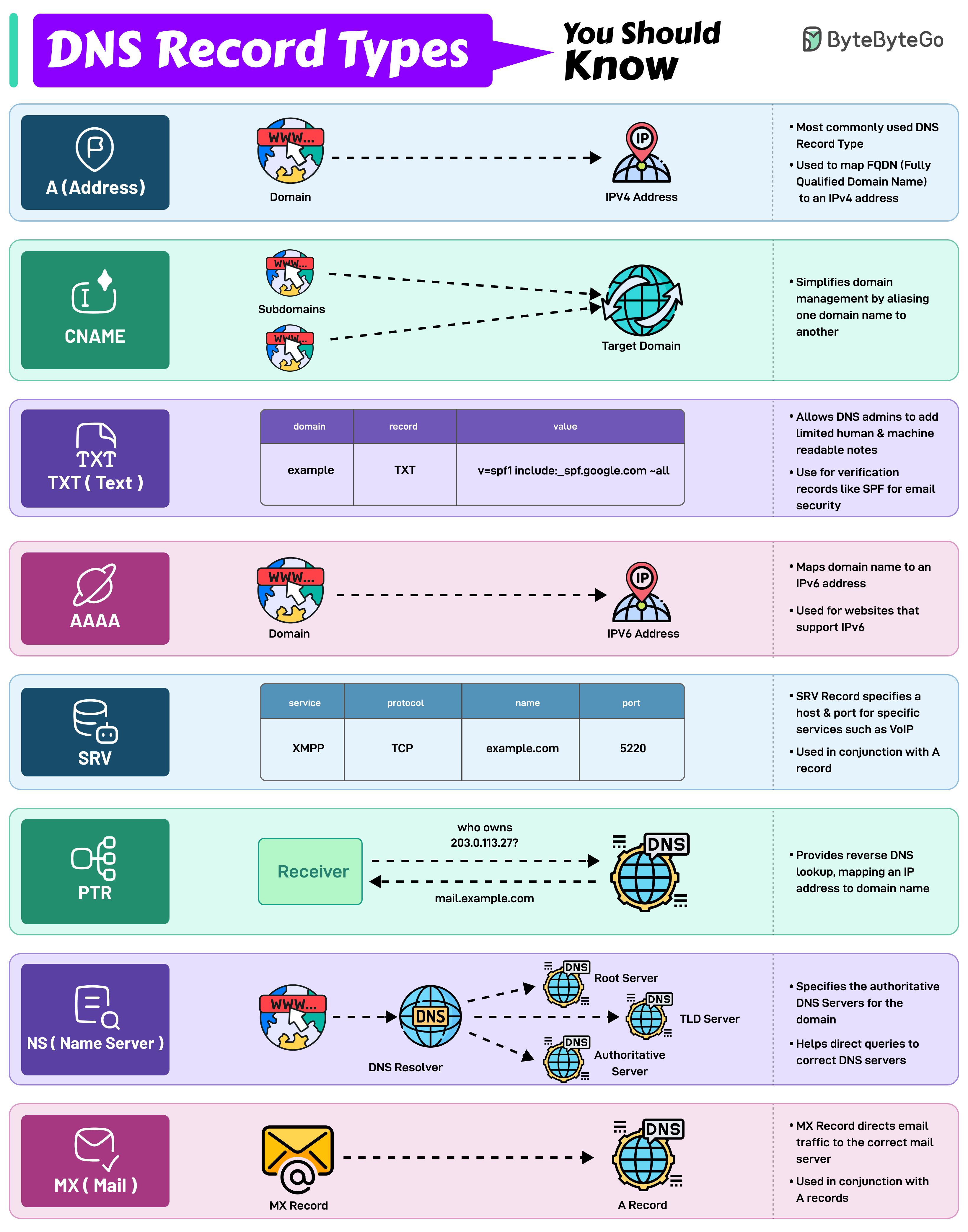
4️⃣ Understanding DNS Records (Domain Setup)
To connect your domain email, your DNS must include:
Record Type | Purpose | Example |
|---|---|---|
MX | Directs mail to your mail server | |
TXT | Verifies domain ownership (SPF/DKIM) | “v=spf1 include:zoho.com” |
CNAME | Alias for domain verification | zoho._domainkey.yourdomain.com |
A | Maps your domain to an IP | 192.168.1.1 |
Tip: Always verify MX and TXT records first — they’re essential for delivery and spam prevention.
ByteBytego provides a detailed visualization and instruction of different records
Source: https://assets.bytebytego.com/diagrams/0175-dns-record-types-you-should-know.png
5️⃣ How Email Sending and Receiving Actually Works
To understand your email system, let’s separate the two main protocols:
Function | Protocol | Analogy |
|---|---|---|
📬 Receiving | IMAP (Internet Message Access Protocol) | Picking up and reading your mail |
📤 Sending | SMTP (Simple Mail Transfer Protocol) | Dropping letters into the mailbox |
✉️ IMAP — For Inbox Syncing
Keeps your emails stored on the server
Syncs across all devices (read/delete once = updates everywhere)
Example: imap.migadu.com
✅ Best for multi-device users and cloud storage
📡 SMTP — For Sending
Sends emails from your client to the recipient’s mail server
Example: smtp.migadu.com
✅ Standard for reliable outbound delivery
Together, IMAP and SMTP complete your full email system.
6️⃣ Building an Email Marketing Workflow
Once your domain and inbox are ready, the next step is to use it as a marketing channel.
Here’s a typical workflow for small business owners:
Build a mailing list
Use signup forms, newsletter pop-ups, or landing pages (e.g., Framer, Carrd, Webflow)
Segment your audience
Separate new users, paying customers, and inactive users
Create automation campaigns
Welcome emails, onboarding sequences, and product launches
Track performance
Open rate, click rate, conversion rate, unsubscribe rate
7️⃣ Recommended Email Marketing Tools
Tool | Focus | Ideal For |
|---|---|---|
ConvertKit | Simple automations, creators & newsletters | Solo founders, bloggers |
Brevo (Sendinblue) | Marketing + transactional emails | SMEs |
Mailchimp | Visual builder + analytics | Beginners |
MailerLite | Affordable and lightweight | Startups, personal brands |
HubSpot Email | CRM + email marketing suite | Growing teams |
Beehiiv / Substack | Newsletter-first, community focus | Content creators |
✅ Tip: Start with free-tier tools until you validate engagement; upgrade only when automation and analytics are needed.
8️⃣ Common Email Marketing Mistakes
❌ Buying email lists
❌ Sending without user consent (GDPR/anti-spam violation)
❌ Ignoring deliverability (SPF/DKIM not set up)
❌ Over-designing — clarity > decoration
❌ Skipping analytics and A/B testing
9️⃣ Example Use Cases
Type | Example | Objective |
|---|---|---|
Welcome Series | Introduce your brand to new subscribers | Build relationship |
Product Launch | Announce a new app, course, or service | Generate sales |
Educational Newsletter | Weekly tips or founder stories | Build trust |
Reactivation Campaign | “We miss you” emails | Re-engage inactive users |
Feedback Request | Post-purchase surveys | Improve product quality |
💬 Final Takeaway
Email marketing is not just about sending newsletters —
it’s about building a consistent, personal conversation with your users.
Start small:
Create a professional domain email
Send valuable, consistent messages
Listen, learn, and iterate
You don’t need a massive list to start — you need a clear voice and a useful message.
Because at the end of the day, the most effective marketing is personal.
GOODA
Copyright by GOODA 2025